← All work [ Case study 03 · AdvoAI ]

One workspace for a law firm’s cases, hearings and team.

Law firms still run on paper diaries, spreadsheets and WhatsApp groups. AdvoAI brings matters, hearings, orders and delegation into one web app — and in v2 it reads court orders, so the team confirms changes instead of retyping them.

Web applicationTeam of 4v2 · 2026
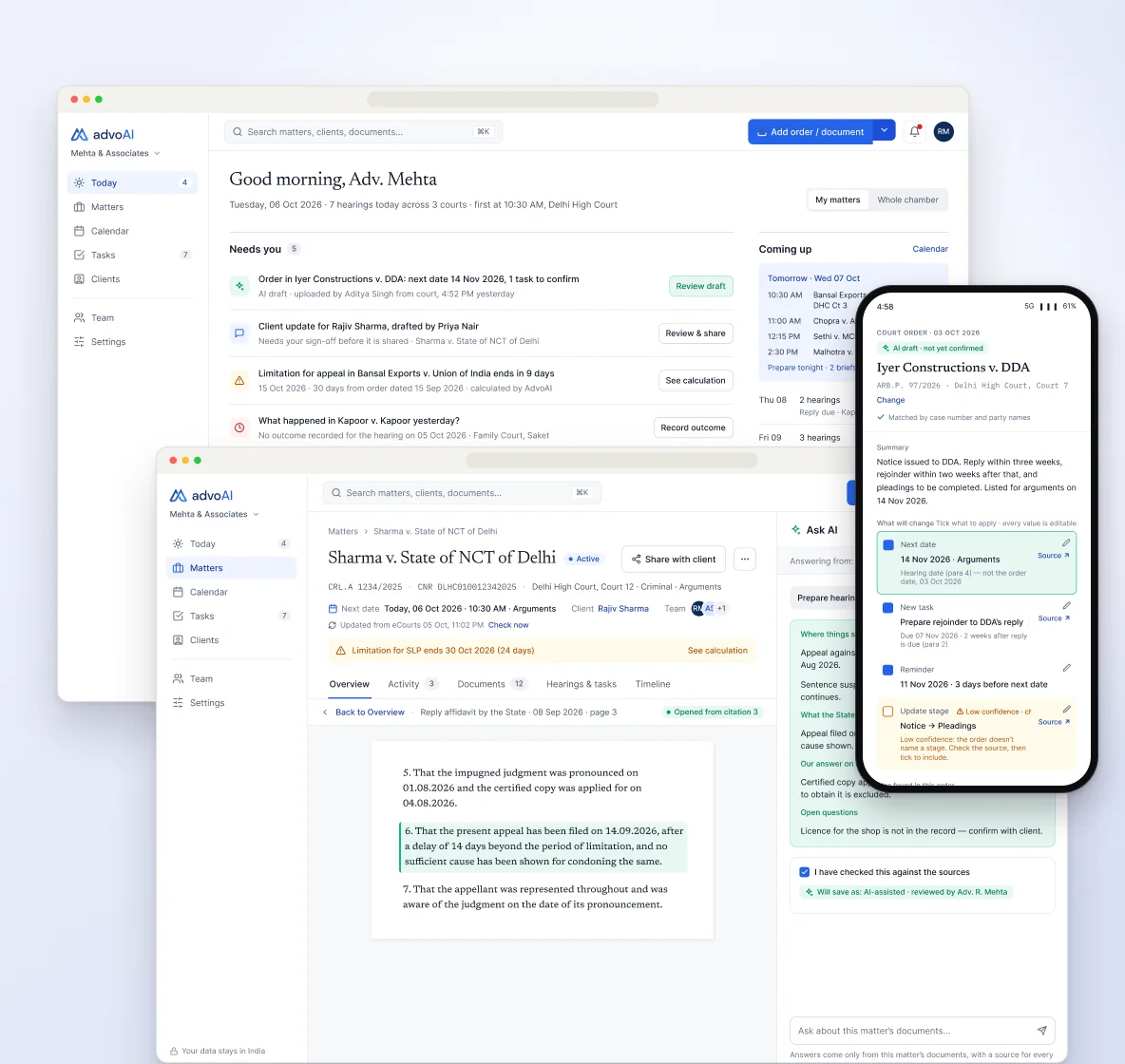
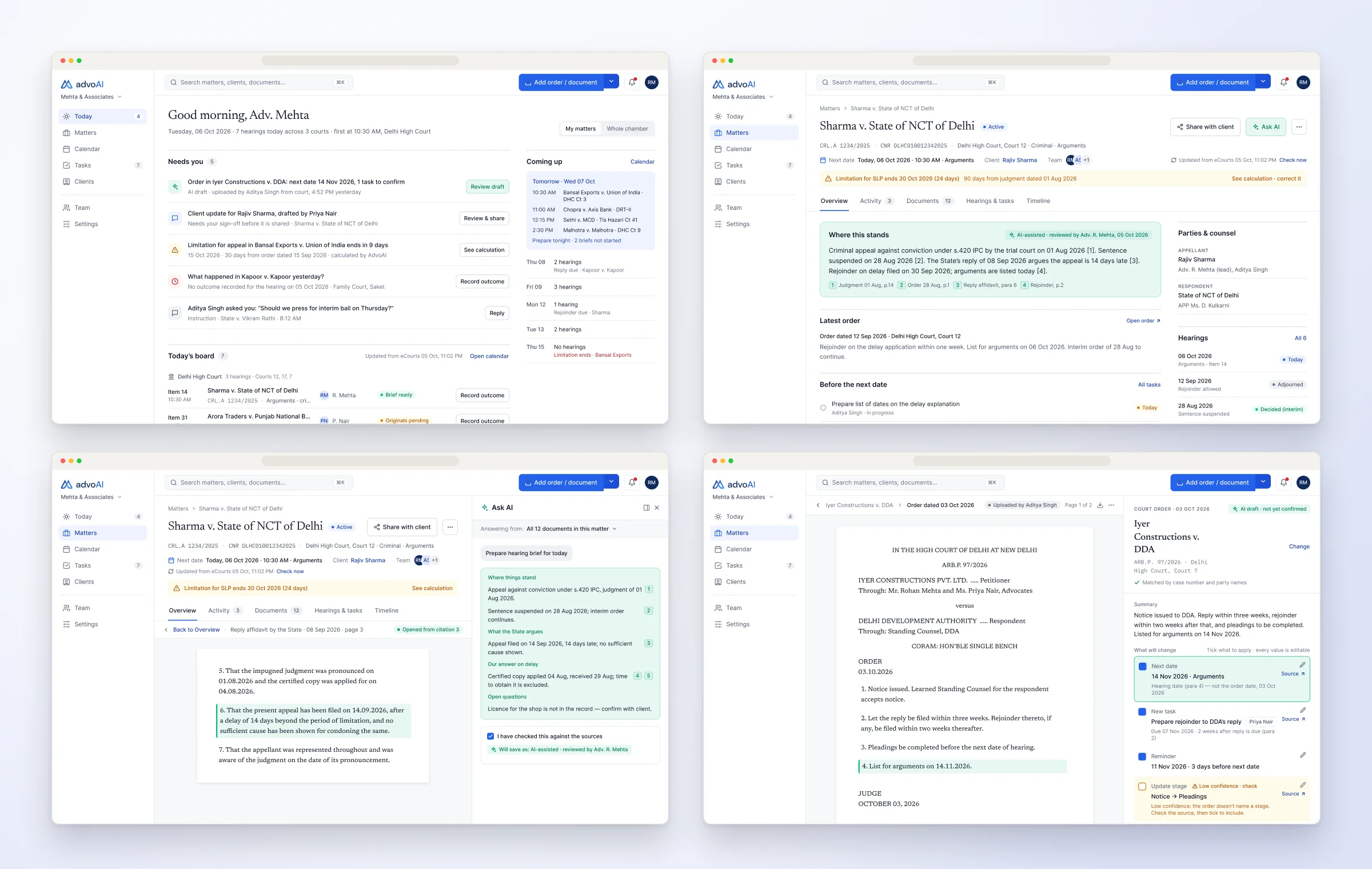
AdvoAI — key screens
Role
Product designer, UX/UI
Timeline
v1 Dec 2024 — Oct 2025 · v2 brief Oct 2026
Platform
Web application, phone-width capture
Team
4 members
[ 01 ] Overview

Bringing a scattered legal practice into one place.

01

The problem

Legal work was scattered across diaries, spreadsheets, WhatsApp and folders — priorities and hand-offs got lost, and every court order meant retyping dates by hand.

02

What I did

Research, information architecture, flows, wireframes, UI and a reusable component system for every role in a chamber.

03

v2

Priority flows from the 05 Oct 2026 brief: capture an order and confirm what changes, Today by role, hearing outcomes and onboarding — as a clickable prototype.

How might we

How might we give a legal team one workspace to organise work and collaborate — without adding complexity?

[ 02 ] IA & decisions

Validated against the brief before any visual design.

Confirmed where we agreed, challenged where testing or the brief’s own principles pointed elsewhere.

  1. 01

    Five places, not fifteen

    Today, Matters, Calendar, Tasks and Clients — with search, + Add and notifications on every screen.

  2. 02

    The hero action

    “+ Add” means Add order / document: the most frequent, most valuable task gets the main button.

  3. 03

    Ask AI is docked

    A right panel on every matter tab — never a tab or a second sidebar.

  4. 04

    Next date is derived

    Never typed on a matter; it changes only when an outcome is recorded or a hearing is added.

  5. 05

    Every date says what it is

    Hearing date, order date, filing deadline, the other side’s deadline, limitation.

[ 03 ] Users

One chamber, four ways of working.

The same Today page, with a different emphasis for each role.

Consumes and signs off

Senior advocate

Today leads with — sign-offs and drafts to review

Needs — to know what changed overnight, without chasing

Drafts and captures

Junior associate

Today leads with — drafts, orders to capture and hearings to prepare

Needs — to hand work up for review cleanly

Runs the board

Clerk

Today leads with — the whole board — printable on A4

Needs — to save hearing dates without waiting on an advocate

Upload-only

Intern

Uploads become — “Waiting for an advocate” drafts in the right queue

Needs — work that never disappears

[ 04 ] Principles & structure

Rules the product holds to.

  1. 01Clarity before complexity — one primary action per screen.
  2. 02Prioritise active work — hearings and pending tasks first.
  3. 03Design for speed — frequent actions within one or two interactions.
  4. 04Disabled actions stay visible, with a one-line reason.
  5. 05Talk about outcomes — “reads your orders” — more than “AI”.
  6. 06Colour has fixed meaning: red urgent, amber needs review, green done, seafoam for AI suggestions.
Hero flow
Add order / documentReading… (you can leave)Confirm cardCheck low-confidence fieldsConfirm changesMatter updated, with Undo
Information architecture
TodayMattersCalendarTasksClientsTeamSettings+ AddAsk AI panel
[ 05 ] Key decisions

The decisions that mattered most.

Decision 01

Read the order, then confirm

The problem

Every court order meant retyping dates, tasks and stages by hand.

What I did

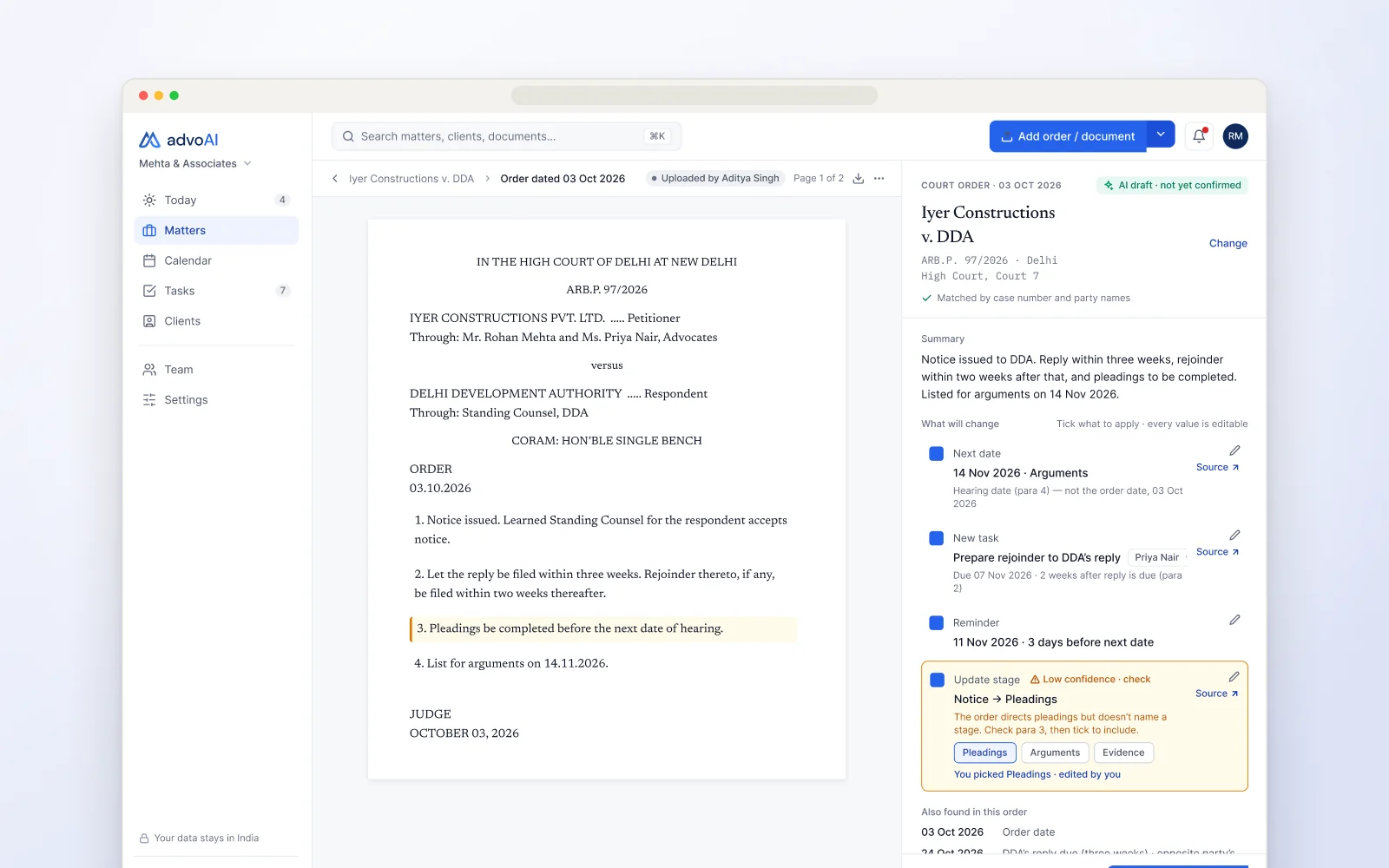
Upload, paste or photograph an order. AdvoAI proposes the changes on a confirm card — next date, tasks, reminders, stage — each linked to its source paragraph.

Why it works

The team confirms instead of types, and every change can be checked against the order.
Decision 02

Low confidence is shown, not hidden

The problem

A confident-looking extraction error is worse than a gap.

What I did

Low-confidence fields are amber and unticked by default, with the reason and a link to the source.

Why it works

People check exactly the fields that need checking.

Decision 03

One Today, three emphases

The problem

Seniors, juniors and clerks start the day needing different things.

What I did

The same page leads with sign-offs for seniors, drafts and capture for juniors, and the whole board for clerks.

Why it works

One product to learn, with the right work on top for each role.

Decision 04

Clerks aren’t blocked

The problem

A clerk can’t confirm tasks or stages, so the whole card used to stop.

What I did

Task and stage rows show as disabled — “Needs an advocate” — while the clerk can still save the hearing date.

Why it works

The date lands on time; the advocate signs off the rest.

Decision 05

Ask AI, with citations

The problem

An answer a lawyer can’t verify is a liability in court.

What I did

Ask AI cites the matter’s documents, opens the source beside the panel, and declines questions outside them.

Why it works

Every answer can be checked before it is used.

Final designs — Today, Matter overview, Ask AI with cited sources, and the order confirm card

Final designs — Today, Matter overview, Ask AI with cited sources, and the order confirm card

[ Closer look ]
Read the order. Confirm the change.
01 / 03Read the order. Confirm the change.AI drafts the next date, tasks and stage from the court order; a low-confidence field points straight to the paragraph it came from.
Record what happened, in seconds.
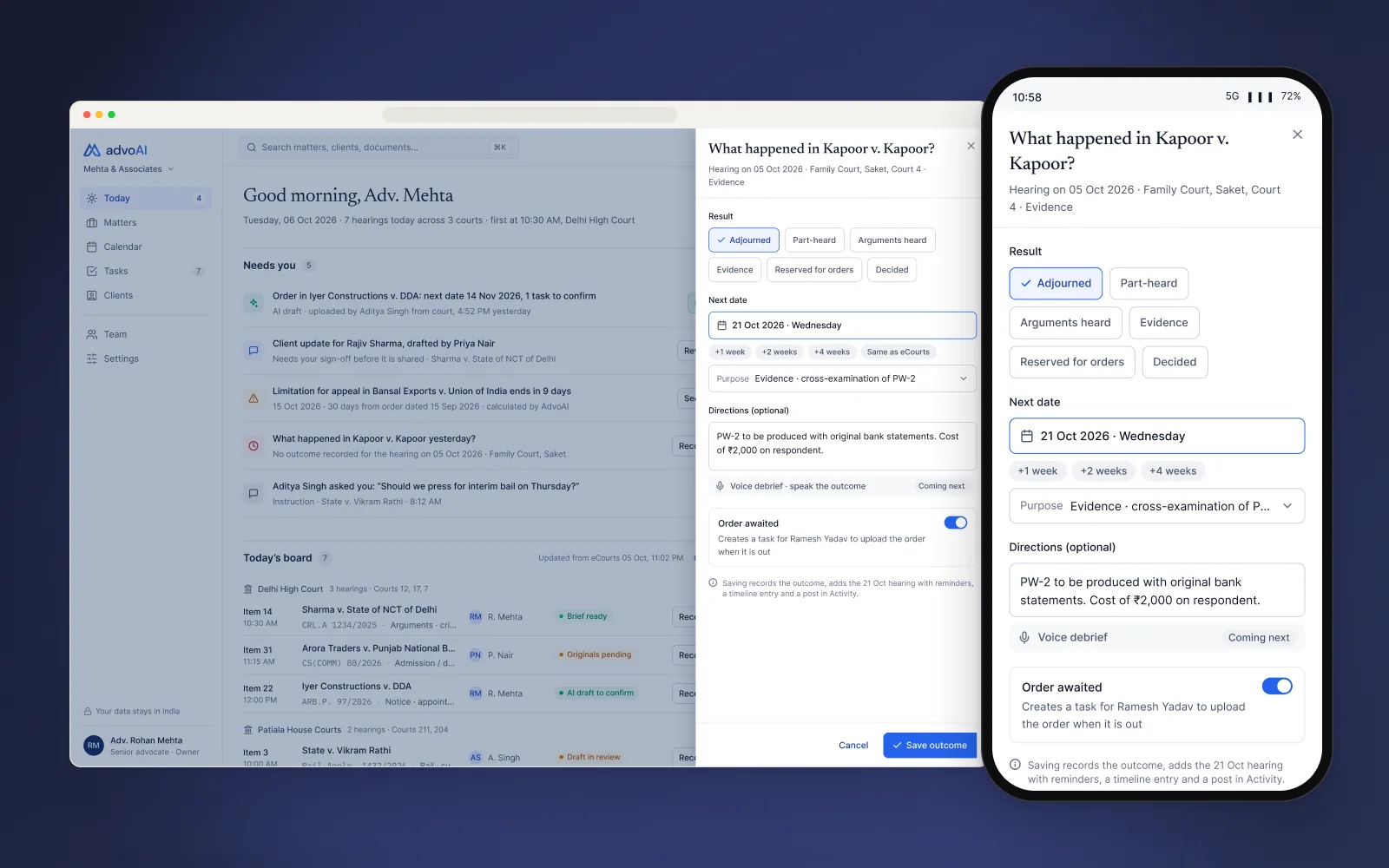
02 / 03Record what happened, in seconds.The hearing-outcome form on web and phone: result, next date and directions, with the follow-up task created for the clerk.
Onboarding that starts with the clerk.
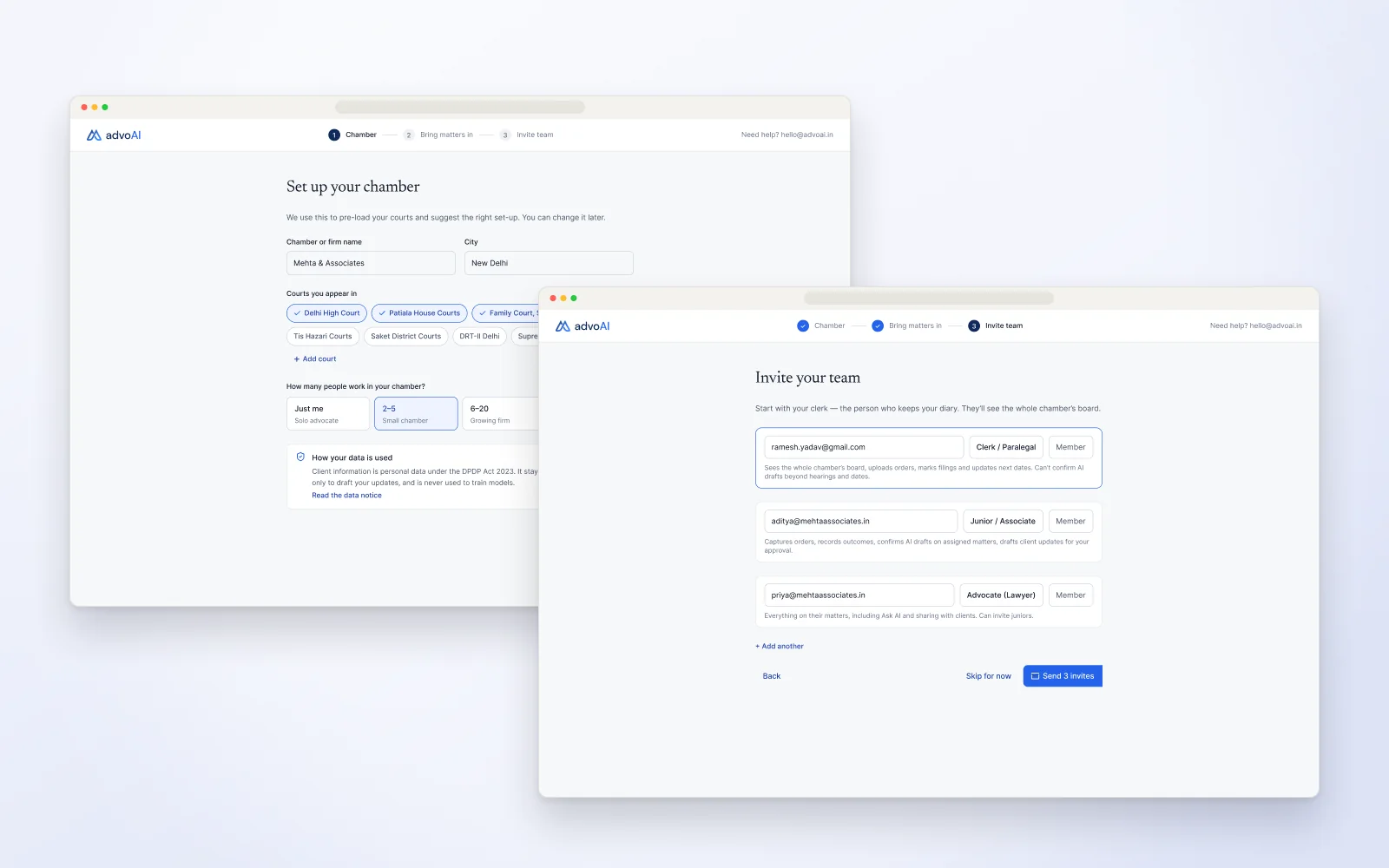
03 / 03Onboarding that starts with the clerk.Chamber setup pre-loads the courts, and invites begin with the person who actually keeps the diary.
[ 06 ] Iteration & system

From a workspace to a product that reads orders.

  1. v1 · 2024–25

    A workspace for the whole chamber

    A Daily Brief, a scannable matters table, a calendar that makes busy days obvious, and roles and consent in the open — on one component library.

  2. v2 · Oct 2026

    Priority flows from the brief

    The capture → read → confirm flow with every edge case (low confidence, no match, duplicate, couldn’t read), Today by role, hearing outcomes and onboarding.

  3. Next

    Testing with advocates and a clerk

    A clickable prototype with five starting points, built for sessions with 3–5 advocates and a clerk.

[ 07 ] Outcomes & reflection

Where it stands.

Outcome
  • v1 was beta-tested with practising lawyers at law firms, who gave positive feedback
  • A reusable component library kept the product consistent across roles and documents
  • v2 is a clickable prototype ready for testing with 3–5 advocates and a clerk
  • Next: test the confirm card with real orders, including photographed ones
What I learned

Progressive disclosure makes dense information usable

The hard part was deciding what not to show on each screen.

What I’d do next

Measure how often confirm cards are accepted unchanged, and which fields people correct.